
How to Evaluate Online Platforms Before Making a Payment
A booking site, an app marketplace and a subscription service can make checkout look equally straightforward. The important differences appear when you ask who takes your payment, what the total covers and how you would get help after the transaction. Those answers belong in the terms, the order summary and the contact information for the company handling the purchase.
Try tracing the purchase before filling in the form. Identify the company behind the website, the product you expect to receive and the account that will hold the receipt. Then look for the policy that would apply if the order were delayed, the price changed or you decided to cancel. A few minutes spent finding those pages can make the next step easier to judge.
If your research leads you to a Neosurf casino comparison, use it to identify questions about the operator, the cashier and the available payout routes. Verify any licensing claim separately. For Ontario, iGaming Ontario publishes a directory of sites offered by regulated operators it has contracted with. Check the exact domain and the jurisdiction the listing covers. The same attention to the company and its domain helps when checking other kinds of online services.
Identify the business and the biller
Look for a company name, a way to contact it and a description of what it sells. If a marketplace handles payment for an independent seller, find out which business takes the money and who handles the order. The marketplace may manage checkout while the seller supplies the product. This matters when you need a replacement, a corrected receipt or a refund.
Check that the domain matches the business you intended to visit. A search result, an advert and a message can all lead to pages that look similar. Navigate using an address or app listing you can independently confirm. Canada’s Cyber Centre provides guidance on shopping online safely, including how to recognise suspicious websites, messages and requests to pay outside the official checkout. Pay particular attention to small spelling changes in a domain and requests to continue a transaction through a private message.
Read the total and the terms together
A price on a product page may be followed by taxes, a service fee or a delivery charge. Review the final amount and currency on the order summary. If the service will charge again, find the renewal amount, billing date and cancellation process. A trial may have a separate date when the regular price begins. Check these dates while you still have the option to choose a different plan.
Read the policy that matches the product. A downloadable game, a monthly subscription and a hotel booking may have different conditions for refunds or changes. If you are paying a deposit, check how it applies to the final balance and when it can be returned. The description of the product and the payment terms should make sense together. Save both if a condition matters to your decision.
Find out when the full amount is due
Imagine a booking that asks for C30todayandlistsC120 due on arrival. The two payments total C$150 in the example. Find out whether both amounts are included in the price you were shown and whether the booking confirmation identifies which company collects the second amount. If the platform describes the first payment as a hold or deposit, check how it treats that amount when the booking is completed or cancelled.
A payment screen can also offer more than one plan at the same headline price. Read the description of each plan and check the conditions that explain when the first charge will appear. For a shared or family plan, check how many people it covers and who can make changes. A short record of those terms makes it easier to see whether a later charge is part of the arrangement you chose.
A short comparison you can use at checkout
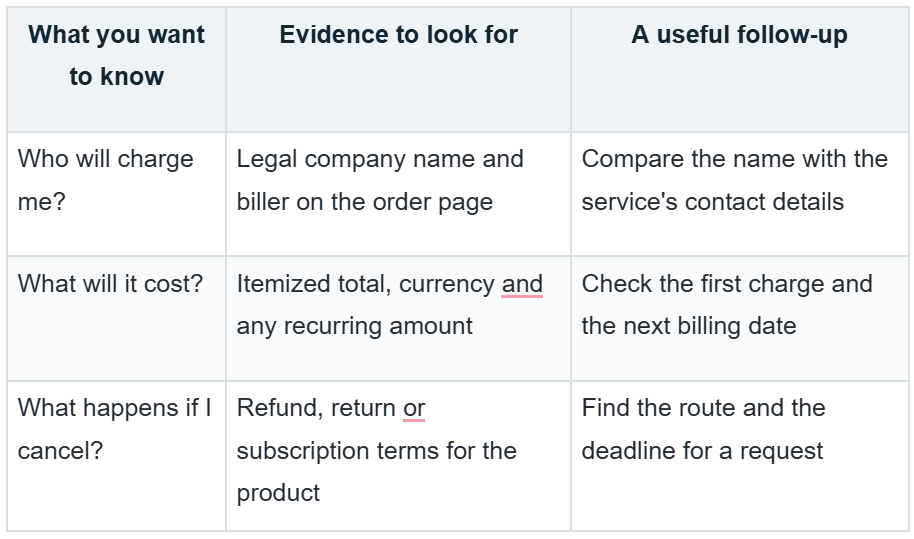
Use the same questions when comparing two platforms. You can write down the answer for each and note where it came from. A clear order summary is more useful than a general promise about fast service. If a point is missing, ask a specific question. For example, ask whether a cancellation request goes to the platform or the seller and which account will show the confirmation.
Check how the payment works
Look for the payment options shown at the end of checkout for your account and location. A general help page can describe several methods while a particular product offers a smaller selection. Check whether the payment is charged immediately, held for confirmation or deducted from an existing balance. Keep enough detail to know what to expect on your statement.
If you want to use a prepaid product, confirm its eligibility before buying it. Check the amount you need, whether the balance can be used for more than one purchase and what the issuer says about unused funds. If you pay through a linked wallet, look at the selected funding source. The payment tool and the account being charged can have different names, which is worth noting when you look for the receipt later.
See what the form asks you to share
A checkout may need different details for a physical delivery, a download and a service attached to an account. Look for the explanation of how the business uses the information it asks for. Review any optional permissions and see which details are required for the product you are buying. If a field seems out of place, read the help page or ask the company why it is needed.
The same check applies to saved cards and accounts. Look for a way to review the stored payment method and see who can approve another charge if you share the account. Before closing the page, make sure you know where to sign in to manage those settings.
Find the support channel before you need it
Try finding a route to support without making a purchase. Look for an order history, help centre or contact page, and see which information is needed to open a case. If the service offers a contact form, check whether you can submit a question from your own account. The response to a clear question can tell you whether the company understands the product and who is responsible for resolving a problem.
Avoid sending payment codes, passwords or full financial records in an enquiry. An order number, the date and the exact amount are often enough to identify a purchase. If the platform requests identification, check its published explanation and use the official channel listed in your account. Start from the service you opened yourself when a message asks you to take action.
Keep a record that answers five questions
What product, plan or service did I agree to buy?
Which company will show on my payment record?
What amount and currency did I approve, and when will any next charge occur?
Where will I find the receipt and the conditions that applied?
Which channel handles changes, refunds or payment issues?
Check the answers while the order is still on screen. A saved copy of the final total and the order terms can help if a detail changes or the purchase does not appear as expected. Keep the record somewhere private and delete any duplicate copy that contains more personal information than you need.
The decision can be straightforward once you know what you are paying for and how the platform handles changes. If you are comparing two services with a similar price, think about which one gives you clearer information about the biller, payment method and cancellation route. Those are the details you can check before paying and use again if you need to resolve an issue.
