
Building a Better Home Theater with Pioneer, Denon and Yamaha Manuals
Dialogue that disappears under the music. Bass that booms in one seat and vanishes in the next. A TV app that plays through the TV speakers no matter what you press on the receiver remote.
Most home theater complaints are not about the equipment. They come from speaker placement, a missed setting or the wrong HDMI port.
The receiver's manual covers all three, but only for that exact model, because terminals, inputs and menus change between generations. Here is how to place speakers, connect sources and calibrate Pioneer, Denon and Yamaha receivers.
Place home theater speakers for the layout you will use
Check the supported layouts and terminals in the manual first. The pioneer manuals library covers far more than receivers, from car audio to DJ gear, so match the exact model on the back panel.
Speaker angles
Dolby's layout guidelines measure angles from the center line of the screen at the listening position:
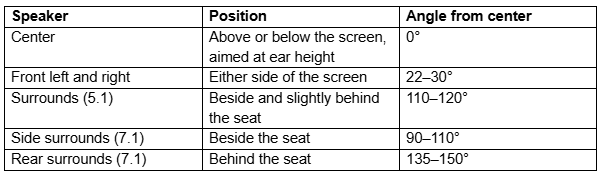
Angle the fronts toward the listening position. In a real room some compromise is normal; the guidelines are a target, not a rule.
Subwoofer and polarity
Placement is everything. Play a bass sweep or a familiar passage with the subwoofer in several positions and listen from the main seat, then from the seats next to it. Moving the subwoofer usually solves a deep dip in bass better than turning it up.
Connect every speaker with the same polarity: red to red, black to black. One reversed connection weakens bass and blurs the image between the front pair.
Connect sources and keep TV audio coming back
Plug each source, such as a streaming box or games console, into a receiver HDMI input, and the receiver's HDMI output to the TV. If a source gives no picture or sound, check which input it is assigned to.
ARC, eARC and optical
TV apps play inside the TV, so their sound must travel back to the receiver. There are three ways to do it:
ARC carries stereo and compressed surround such as Dolby Digital.
eARC adds multichannel PCM and lossless formats, provided both devices and the cable path support it.
Optical carries stereo and compressed surround, but not multichannel PCM or lossless audio.
On the TV, set audio output to the external system. Then select the receiver input used for the return path, often labeled TV Audio, and enable HDMI control or ARC in the settings if the manual requires it.
Denon receivers vary in port labels and in which HDMI input supports the newest video formats. The denon manuals library has the connection diagram for each model.
Assign speakers and calibrate the receiver
Tell the receiver which terminals you are using. On many models, one pair of amplifier channels can drive surround-back speakers, height speakers, a second zone or bi-amping, and you choose which in the speaker assignment menu.
Before calibration, set the subwoofer's controls to the starting positions in its manual and the receiver's. A common starting point is the low-pass filter at its highest setting, or the LFE or bypass input if there is one, so the receiver handles the crossover.
Automatic calibration
Each brand has its own system: MCACC on Pioneer, Audyssey on Denon and YPAO on Yamaha. All three use the supplied microphone. Find the procedure for your model, including YPAO options, in the yamaha manuals library.
Put the microphone on a tripod or a steady support at ear height in the main seat. A sofa cushion is not steady.
Keep the room quiet, and leave it if you can.
Move the microphone only when prompted. Many systems measure several seats for a better average.
Check the detected sizes and distances, then the levels and crossover.
Reading the results
A distance that differs from your tape measure is normal, because the receiver measures time delay through the electronics and the speaker. A speaker reported as missing needs a wiring and assignment check, then its test tone.
Small and Large describe bass handling, not cabinet size: a speaker set to Small sends everything below the crossover to the subwoofer, which usually handles deep bass far better. THX recommends 80 Hz as a starting crossover, and it suits most bookshelf and many floorstanding speakers.
Fix missing sound, weak bass and quiet dialogue
No sound or a silent channel
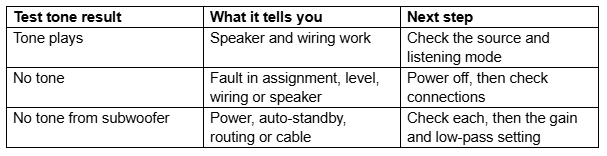
Check that the receiver is not muted, the right input is selected and the source sends a format the receiver can decode. Then run the receiver's test tone:
Bass and dialogue
Weak bass can come from the content, the listening mode or placement. With speakers set to Large, stereo music may send little to the subwoofer at all.
For quiet dialogue, check the center speaker's connection and level, then try a film you know has a clear center mix. If a different listening mode helps, the problem lies in the original mix or the processing, not the speaker.
Lip-sync and dropouts
Early sound needs audio delay. If it arrives after, reduce any manual delay and compare the automatic lip-sync settings on the receiver and TV. For dropouts, change one thing at a time: cable, format, return-path setting or firmware.
Record the working setup
Libraries hold several revisions. Confirm the model on the cover matches the receiver. When everything works, test each source and the TV return path, then write down the input assignments and speaker settings. Save them before any factory reset, which should always come last.
